Secret Chats & Master Key
Hide private conversations behind custom lock keys or a universal Master Key with zero inbox traces
Privacy engineered for complete discretion. Lock any 1-on-1 direct message or group conversation behind a custom secret passcode. Locked chats vanish completely from your main chat list and recent feeds. Reveal them on-demand by searching your secret key or universal Master Key. In DMs, optionally mirror the lock to your recipient so both parties communicate inside an impenetrable private vault.
Secret Chats & Master Key in Action
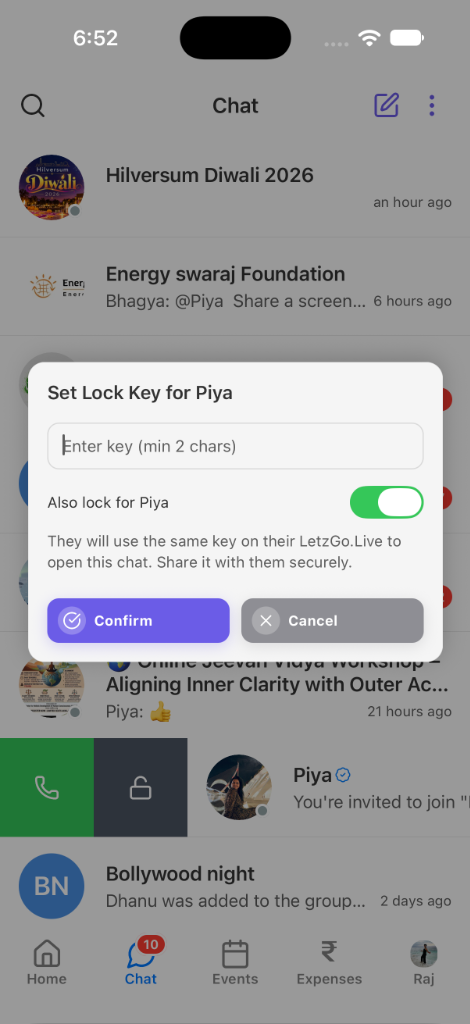
Swipe on any chat to set a custom lock key (min 2 chars). Toggle "Also lock for recipient" to mirror protection, completely hiding the conversation from the inbox.
How to Use Secret Chats & Master Key
A simple workflow built into every LetzGo experience.
Swipe Left to Lock Any Conversation
Swipe left on any conversation in your chat list and tap the green/slate Lock icon to open the key dialog.
Set Lock Key & Optional Peer Mirroring
Enter a key with at least 2 characters. In direct messages, turn on "Also lock for recipient" to require the same key on their device.
Complete Inbox Disappearance
The conversation immediately disappears from your inbox, search history, and push notification previews.
Reveal via Search Bar or Master Key
Type the chat secret key (e.g. #key or key) or your universal Master Key directly into the chat search bar to reveal hidden conversations.
Key Benefits of Secret Chats & Master Key
Zero Inbox Footprint
Casual observers looking over your shoulder cannot see hidden chats in your list or search results.
Universal Master Key
Set a Master Key in security settings to unlock all your secret chats at once without memorizing separate keys.
Client-Side Key Encryption
Lock keys and master keys are encrypted client-side using TweetNaCl secret-box algorithms before storing.
Two-Factor Reset Safeguard
Resetting forgotten secret chats requires SMS/OTP phone verification to prevent unauthorized device tampering.
Technical Architecture
Used Across These Real-World Journeys
Frequently Asked Questions
How do secret chats stay invisible in the app?
When a chat is locked, its identifier is marked in your local and encrypted cloud vault. The chat list filters out all locked items, meaning it does not appear on screen or reveal message previews until revealed.
What is the Master Key and how do I use it?
The Master Key is your universal passcode. Entering your Master Key in the chat search bar immediately reveals all of your locked chats simultaneously, saving you from remembering individual keys for each friend or group.
What does "Also lock for recipient" mean in DMs?
When toggled on during key setup, the lock requirement is securely mirrored to your recipient. They will need to enter the exact same passcode on their LetzGo app to unlock and view the conversation.
How can I reset secret chats if I forget my key?
Navigate to Settings > Chat & Groups > Secret chats > Reset Secret Chats. An SMS/Phone OTP verification is required to verify your identity before safely clearing secret messages and resetting your Master Key.
Explore Related Features
Smart Coordination Chat
Messaging designed for experiences, not noisy chatter. Coordinate effortlessly with end-to-end encrypted chat, pinned itineraries, interactive decision polls, collaborative checklists, and scheduled broadcast messages.
DigiLocker Identity Verification
Safety and community trust come first. LetzGo provides official government identity verification — powered by DigiLocker for India, with verification for other countries launching soon. Earn a verified profile badge, build authentic trust across group chats and expense ledgers, and host certified events without exposing sensitive document copies.
Web Command Center
When managing a 150-guest wedding, corporate workshop, or society mela, a phone screen isn’t enough. The LetzGo Web Command Center provides a full-featured desktop dashboard with large-screen spreadsheets, analytics, and attendee rosters.
Ready to Use Secret Chats & Master Key?
Available right out of the box on mobile (iOS & Android) and on the web dashboard.